Why is a self-hosted stack an ownership decision, not just a platform choice?
For a research-use-only (RUO) peptide store, ecommerce infrastructure has to do more than render product pages and accept orders. It has to preserve business continuity when a payment relationship changes, a hosting vendor changes its risk posture, a plugin fails, or a storefront needs to be rebuilt without losing the catalog and customer history that took years to assemble.
That is why founders in restricted categories eventually evaluate self-hosted architecture. Hosted platforms are convenient because they package hosting, checkout, updates, themes, and integrations into one service. They are also centralized. The same vendor that provides the storefront may control the application environment, constrain payment options, and retain the practical ability to suspend the account under its acceptable-use policies.
Self-hosting changes the control boundary. Your company runs the application on infrastructure it controls or leases directly. More importantly, your product data, customer records, order history, content, and integration code can be backed up, exported, and restored independently of any one commerce vendor when the stack is documented and operated properly. A processor can still decline an application, place a rolling reserve, or terminate a merchant account. A rolling reserve means a processor or acquiring bank holds back a percentage of settled funds for a moving period, often to cover chargeback exposure. A self-hosted stack does not eliminate that operational reality. It does mean a payment change does not automatically require rebuilding the entire business on a new platform.
“In restricted commerce, the storefront is not the asset. Control of the data, deployment pipeline, and checkout integration is the asset.”
This distinction is acute for stores selling research materials such as peptides. The business needs precise product information, RUO language maintained across the catalog, documentation workflows, and payment architecture that can be adapted without waiting for a platform marketplace to approve an app. It also needs disciplined operations. Owning the stack means owning patching, backups, security response, uptime monitoring, and the consequences of bad deployment decisions.
The four realistic paths are WooCommerce, Medusa, Saleor, and a fully custom build. All can be self-hosted. They differ radically in how much is already built, how payment logic is extended, how expensive change becomes, and how much engineering capability you must retain.
What does a self-hosted ecommerce platform for high-risk products actually need to do?
Before comparing frameworks, define the operational surfaces the stack must support. Many migrations fail because the team compares themes and product-page aesthetics while overlooking checkout behavior, order state transitions, fulfillment exports, and recovery procedures.
- Data ownership: You need direct access to the production database, object storage, customer exports, product records, order records, and media files. A nightly database dump alone is not enough if certificates, product PDFs, and storefront assets live elsewhere.
- Hosting sovereignty: Here, I mean practical control over where the application runs and how it can be restored. That control is verified through infrastructure access, contracts, backups, and key management, not by the phrase “self-hosted” alone.
- Checkout flexibility: The stack must support the payment method your merchant account, gateway, and underwriting arrangement allow. That can include card processing through a gateway, bank-transfer instructions, or a separately integrated crypto payment rail. It should not assume one default platform processor is permanent.
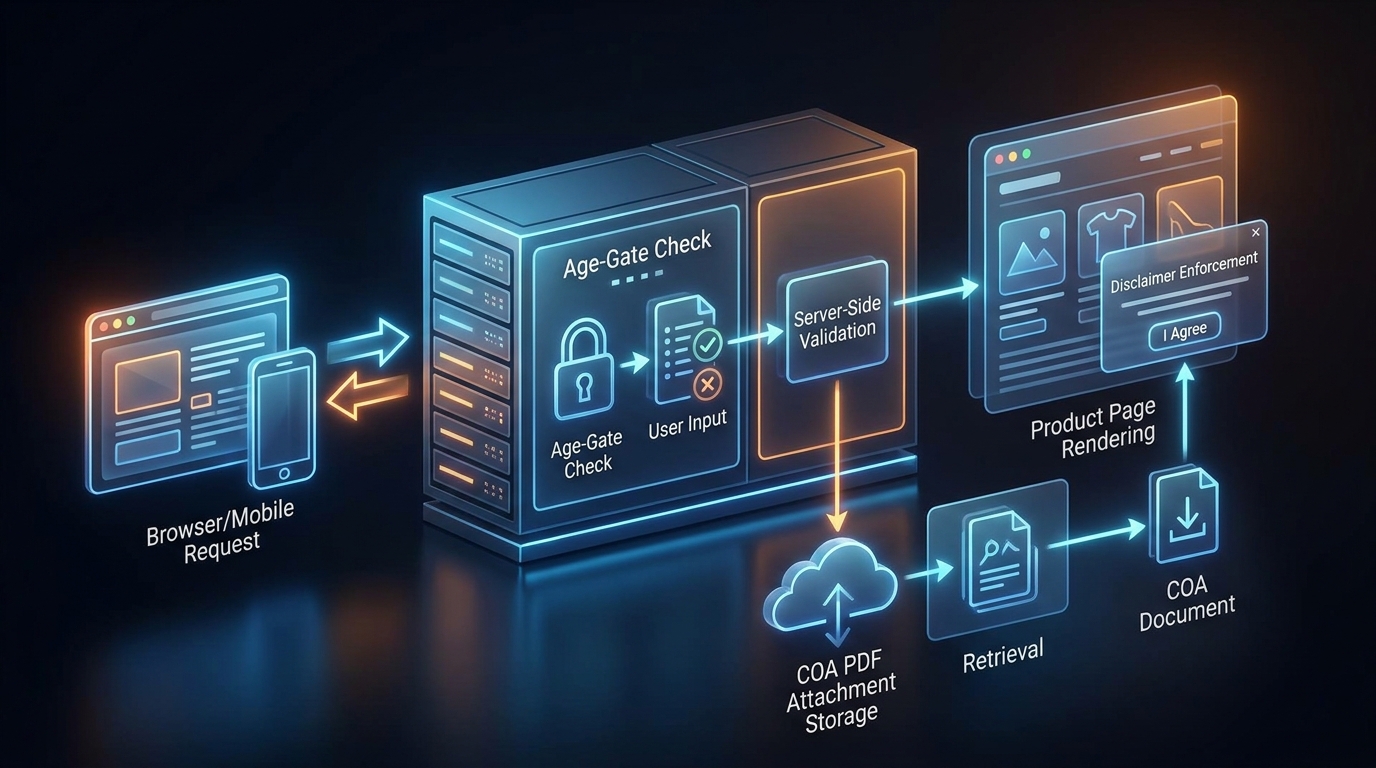
- Documentation controls: Product pages should reliably display the product information, certificates of analysis (COAs), where the operator chooses to publish them, and research-use-only notices. The mechanism matters: a random PDF link added by a content editor is less reliable than a structured product-document field with publishing rules.
- Age-screening workflow: A simple age gate generally records an affirmation or blocks access based on a visitor selection. It is not the same as identity verification. If your business needs more rigorous checks, that is a distinct integration and policy decision.
- Security and auditability: Administrative access, payment webhooks, order exports, API keys, and deployment privileges need controls. Restricted-category stores cannot treat their checkout as a collection of unreviewed plugins with broad administrator access.
- Migration readiness: The catalog, redirects, customer data, subscriptions if applicable, and order history must be exportable in formats that another system can ingest. Ownership without portability is incomplete ownership.
The architecture should separate what changes often from what must remain stable. Product content and marketing pages may change every week. Payment adapters, order accounting, customer identity, and inventory records should change more deliberately. A well-designed stack keeps these concerns separate so a landing-page update cannot accidentally disrupt checkout.
How do gateway, processor, MID, acquiring bank, rolling reserve, and MATCH list fit together?
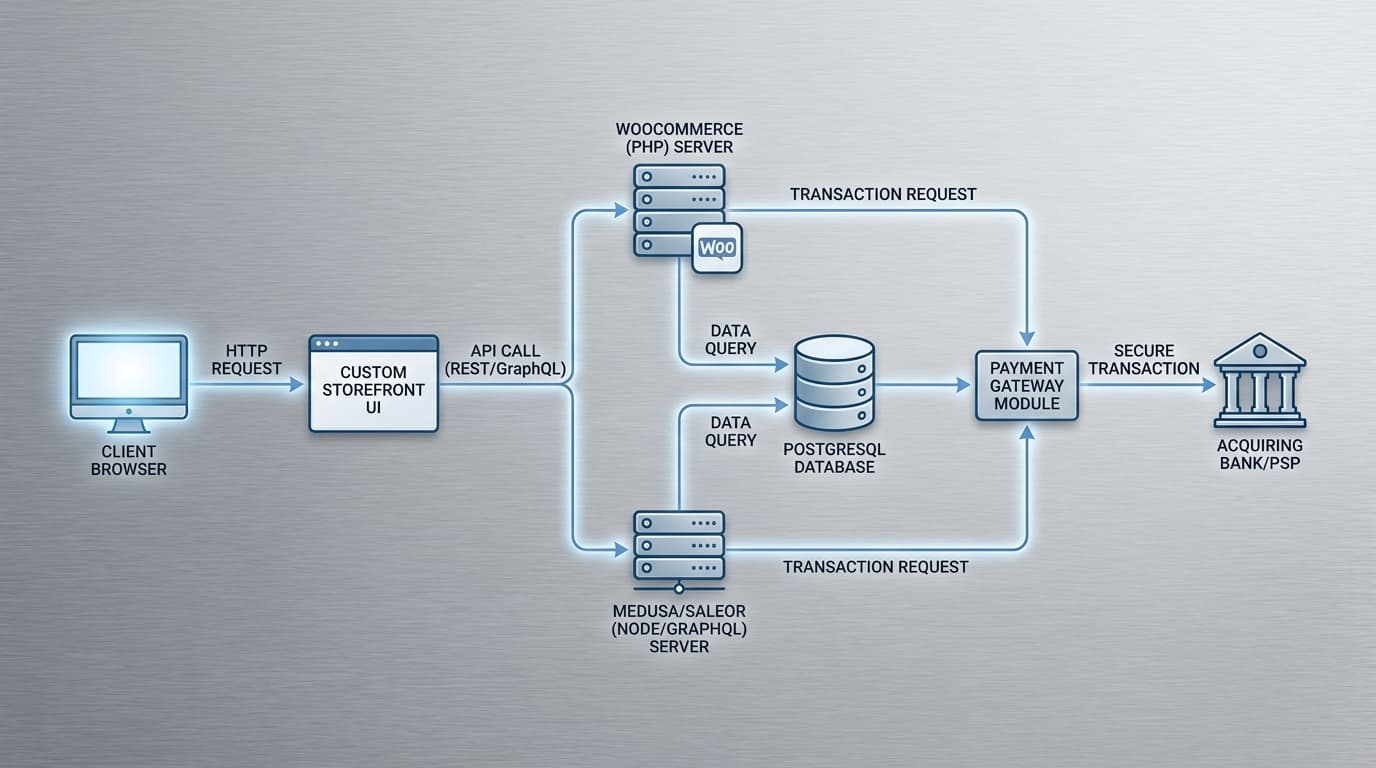
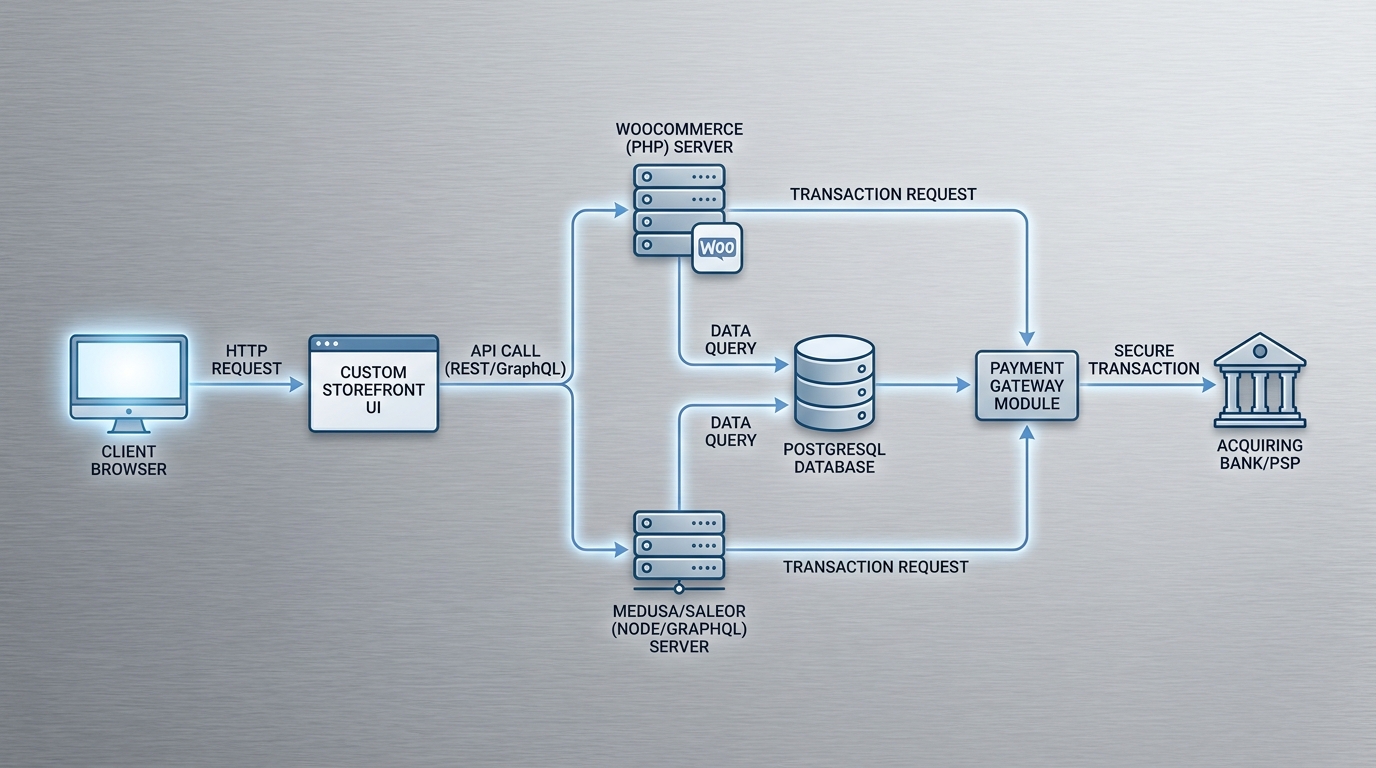
Payment terminology is frequently compressed into the phrase “payment processor,” which obscures the actual failure modes. The merchant account, often associated with a merchant identification number or MID, is the commercial relationship through which card transactions are accepted. The processor handles transaction processing. A payment gateway securely carries checkout data between the storefront and processing systems, often through a hosted field, iframe, redirect flow, or API.
The acquiring bank is the bank that sponsors the merchant account and settles card funds into the merchant relationship behind that MID. In restricted categories, the acquiring bank and the gateway may not be the same company, and that distinction matters. One party may provide the technical rails while another party decides reserve terms, review standards, or whether the account remains active.
In an iframe or hosted-field checkout, sensitive card-entry fields are served by the gateway within the merchant’s checkout page. In a redirect checkout, the buyer leaves the storefront for a processor-controlled payment page, then returns after authorization. In a direct API pattern, the storefront exchanges data with the payment provider using a tokenization workflow. The correct model depends on the provider’s integration requirements and your team’s capacity to operate the resulting security responsibilities.
Tokenization is central to payment portability. The storefront should receive a payment token, not retain raw card data. A token usually has meaning only within the vault of the provider that issued it. That creates an important limitation: moving to a new gateway may require customers to enter payment details again, because one processor’s stored token cannot necessarily be used by another. For a single-purchase RUO store, that is mainly a checkout-conversion concern. For a store with recurring billing, it can become a migration-critical constraint that must be understood before selecting any provider.
Multi-processor architecture is not simply installing two plugins and hoping one works. It requires a routing layer. That layer decides which processor receives a payment request based on configuration such as payment method, currency, order total, customer geography, product category, or processor availability. The checkout must create one internal payment attempt, record the chosen route, receive the processor response, and safely update the order state.
If a processor or acquiring bank adds a reserve, the practical effect is often cash-flow pressure rather than storefront failure. Typical rolling reserves run for 90 to 180 days, and release timing is tied to the provider agreement and batch history rather than a universal rule. If an account is terminated for risk, founders also worry about the MATCH list, short for Member Alert to Control High-Risk Merchants, which is a card-network database used by acquiring banks when evaluating merchant risk. That is exactly why I separate payment continuity from storefront continuity: even when the merchant account changes, the catalog, customer records, and deployment path should not disappear with it.
Webhook verification is where many otherwise capable stores fail. A processor may authorize a transaction at checkout but notify the commerce backend asynchronously that the payment was captured, failed, refunded, or disputed. The webhook receiver must verify the provider’s signature, reject replayed events, store the event identifier, and process events idempotently. Idempotency means that delivering the same webhook twice produces the same final order state rather than two fulfillment jobs or duplicate accounting entries.
If the webhook endpoint is unavailable during a deployment or DNS incident, the payment provider may retry for a limited period. Your system needs a reconciliation job that queries the provider’s API for unresolved payment attempts after service restoration. Otherwise, an order can remain marked as pending in the store while payment has actually settled, or it can be released to fulfillment based on a stale browser redirect rather than a verified provider event.
“A second processor is not failover until the checkout, webhook pipeline, refunds, and reconciliation procedures all work for both.”
Crypto payment rails can be integrated as a separate payment method, generally through a payment service API that creates an invoice or payment session. The backend should treat confirmation as asynchronous. It should record the provider invoice ID, expected amount, selected asset if relevant, expiration time, and confirmation status. Never mark an order paid solely because a buyer reaches a “success” URL. The authoritative state must come from a signed provider callback or a reconciled API query. Refund operations, exchange-rate presentation, accounting exports, and customer-support scripts need to be designed before launch, not after the first exception.
When is WooCommerce the right fit?
WooCommerce is a WordPress plugin and remains the most familiar self-hosted entry point for many founders. It combines a mature product and order system with the largest available ecosystem of themes, extensions, content tooling, and general WordPress operators. For a small team moving off a hosted storefront, that familiarity is a real advantage.
Its strongest feature is breadth. Product pages can use established WordPress editorial workflows. Age-gate plugins can block catalog access or display an acknowledgement flow. Structured custom fields can attach COAs to product records. Disclaimer tools can inject sitewide text into designated surfaces. Payment gateways commonly arrive as installable extensions rather than custom engineering engagements.
That speed has a cost. WordPress sites often accumulate plugins because every requirement looks like a small install: caching, backup, email, shipping, analytics, checkout customization, PDF display, age gate, SEO, security, and payments. Each extension adds code, update risk, compatibility constraints, and another party that may abandon maintenance. A plugin conflict that merely breaks a blog layout is inconvenient. A plugin conflict that disables checkout or exposes an administrative route is a business incident.
WooCommerce is most effective when you impose a plugin budget. Maintain a written inventory of every plugin, its owner, renewal date, role, update history, and replacement path. Test updates in staging before production. Remove plugins that duplicate functionality. Keep custom checkout logic in a version-controlled custom plugin or child theme rather than scattering snippets through the WordPress administrator interface.
Hosting can range from managed WordPress services to a virtual private server, but the low sticker price of shared hosting is rarely the right comparison. A production store needs TLS certificate renewal, a web application firewall, database backups, offsite media storage, uptime monitoring, and a recovery path. If the checkout is commercially important, the database and uploaded certificate files should be backed up separately, with restore tests rather than mere backup-success notifications.
As a planning baseline, a VPS often starts around $20 to $100 per month, while managed hosting spans a much wider range depending on support level and infrastructure. Premium managed WordPress can start lower, but more involved managed arrangements can begin around $149 per month and rise quickly once you add operational support, storage, or traffic headroom. The point is not the exact number. The point is that hosting is usually cheaper than one preventable checkout outage.
WooCommerce fits founders who need a practical, content-heavy storefront quickly and can maintain strict extension governance. It is less attractive when checkout logic, payment routing, and custom operational workflows are central to the business model.
When does Medusa make sense?
Medusa is a headless commerce framework built around a JavaScript and TypeScript development model, typically deployed with Node.js and PostgreSQL. “Headless” means the commerce backend is separated from the storefront. The backend exposes APIs for products, carts, customers, orders, and payments; the frontend is a separate application that consumes those APIs.
That separation is valuable when your storefront needs to move independently of the commerce engine. A Next.js storefront can render catalog pages for speed and search visibility, use incremental static regeneration for products that change periodically, and call the commerce backend only for dynamic work such as cart and checkout. The design team can rebuild the visual experience without migrating order data. The operations team can change payment modules without rewriting every marketing page.
Medusa’s trade-off is that it provides fewer ready-made compliance-oriented storefront components than WooCommerce. An age-screening modal, structured certificate display, customer acknowledgement records, or bespoke order-review workflow may need to be designed and implemented by your team. That takes longer at the beginning, but it can create a cleaner result: the certificate is a first-class product attribute, for example, rather than an attachment managed by an unrelated plugin.
Payment integrations are modular, but a gateway without a maintained module becomes a development task. The work includes authorization, capture, refunds, webhook verification, error translation, dashboard configuration, and testing against provider sandbox environments where available. A developer who has only implemented the initial “pay” action has not completed a payment integration.
The practical advantage of Medusa is not just modern code. It is operational separation. When content, storefront rendering, checkout orchestration, and payment integration are distinct concerns, your team can replace one layer without rewriting everything else. That matters in restricted categories, where the payment layer may need to change faster than the product-education layer.
Medusa is a strong fit where custom workflow is more important than initial setup speed: complex product metadata, bespoke order rules, several payment methods, or a storefront experience that needs to be distinct from standard templates. It is a poor fit for a founder who expects to operate without a dependable Node.js developer or managed engineering partner.
Where does Saleor fit?
Saleor is a headless ecommerce platform built around a GraphQL API. GraphQL gives the storefront explicit control over the data it requests. Instead of making separate fixed API calls for product information, inventory, images, attributes, and pricing, a frontend can request the precise fields needed for a page. For a custom Next.js storefront, this is a clean model: the storefront queries Saleor for catalog data, renders the experience independently, and uses mutations for cart, checkout, and order actions.
Saleor is particularly well suited to stores that need a deliberate, composable architecture. Product attributes can model structured operational data. Apps and webhooks can extend behavior without directly editing the core platform. A payment integration can be handled through an app layer that communicates with a gateway, while the commerce engine retains the authoritative checkout and order states.
The benefit is not that GraphQL makes a store automatically easier. The benefit is that it makes the boundary between systems visible. The frontend owns presentation. Saleor owns commerce state. A payment app owns provider-specific logic. An email platform owns transactional delivery. When the boundary is clear, replacing one element is less likely to destabilize every other element.
Saleor requires stronger engineering hygiene than a basic WooCommerce store. It is commonly deployed using containers, with services for the Saleor application, PostgreSQL, Redis or task-processing components, and an object-storage service for media. Docker makes environments repeatable, but it does not operate them for you. Kubernetes can help larger teams manage scaling and deployments, but it adds substantial operational complexity. A small store does not need Kubernetes simply because it is fashionable; a carefully managed Docker deployment on suitable infrastructure can be the more responsible choice.
Saleor also requires a custom storefront. That is a cost, but it is also the ownership advantage. A Next.js storefront can be maintained as a separate repository, deployed independently, and designed around the exact product-education and documentation flow the store requires. The storefront is not trapped inside a theme system that limits checkout presentation or content architecture.
For many established restricted-category stores, Saleor occupies the practical middle ground between WordPress convenience and a fully custom commerce engine. It provides a mature commerce core without forcing the company to accept a closed hosted platform’s application boundary.
When is a custom build justified?
A fully custom platform means the team owns the product catalog, pricing, cart, checkout orchestration, customer accounts, order management, fulfillment integration, and administrative interfaces as application code. It can be built with almost any stack: a Next.js frontend, a Node.js or Python backend, PostgreSQL, Redis, a queue, and object storage are common ingredients. The question is not whether this can be done. It can. The question is whether building commodity commerce primitives is the best use of capital and engineering attention.
Custom architecture makes sense when your business has workflows that platforms cannot model cleanly: unusual B2B ordering, product configuration rules, internal laboratory-document workflows, proprietary inventory processes, or a payment-routing engine that must be deeply integrated with order review. It also makes sense when ecommerce itself is a strategic software capability, not merely the channel through which a catalog is sold.
The danger is underestimating the long tail. A custom cart is easy to demo. Correctly handling tax settings, refunds, partial fulfillments, inventory reservations, promotional edge cases, concurrent cart updates, abandoned payments, customer-service adjustments, exports, fraud-review queues, and accessibility is a permanent engineering commitment. The team also has to build back-office tooling that WooCommerce, Medusa, and Saleor already provide.
Custom build is not the “premium” choice by default. It is the right choice only when the cost of adapting an existing commerce engine exceeds the ongoing cost of owning a software product.
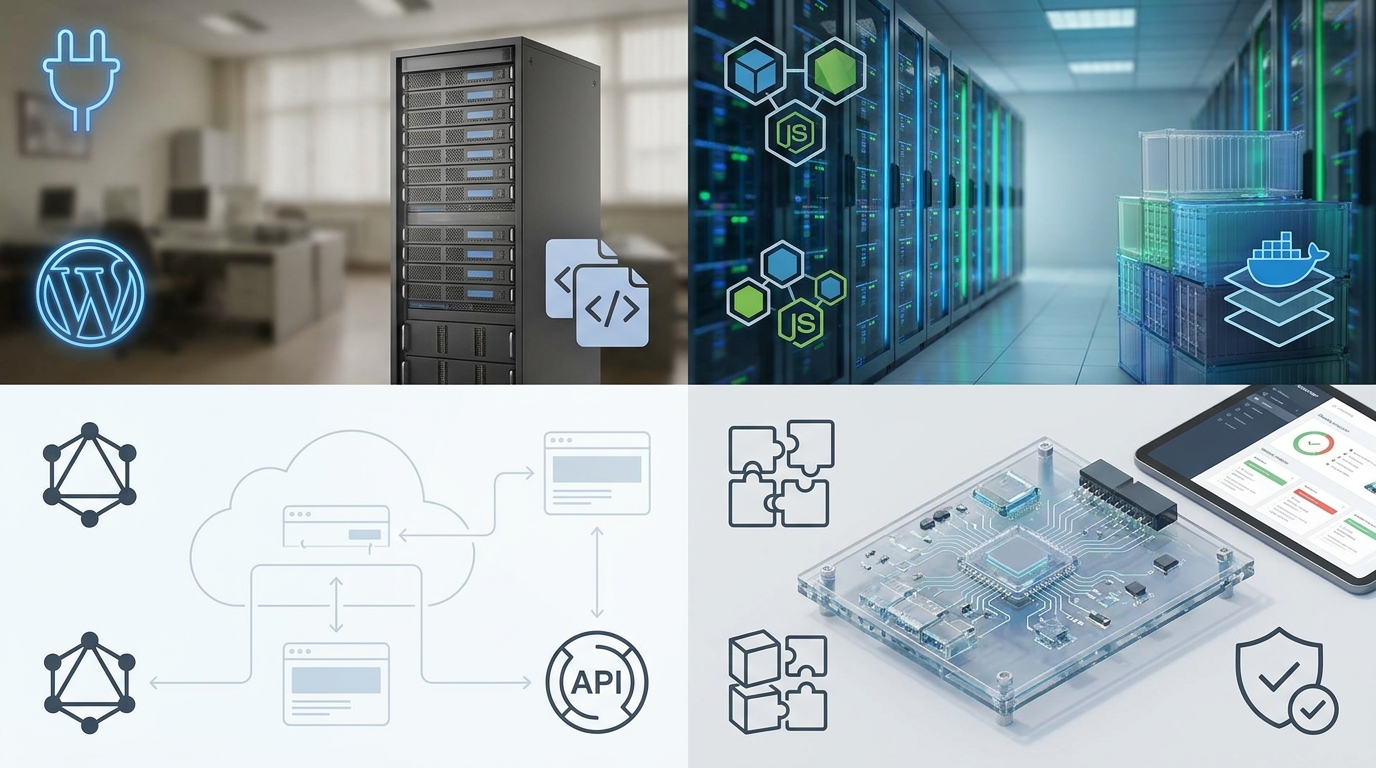
How do WooCommerce, Medusa, Saleor, and custom builds compare side by side?
| Platform | Best Fit | Payment Flexibility | Compliance and Content Controls | Primary Cost Driver |
|---|---|---|---|---|
| WooCommerce | Founders needing speed, familiar administration, and a broad extension ecosystem. | Strong through gateway plugins and PHP customization, but plugin quality varies. | Fastest access to age gates, document attachments, and sitewide notices. | Ongoing plugin maintenance, security work, and periodic development. |
| Medusa | Developer-led stores requiring custom workflows and a modern API-first backend. | High, but unsupported gateways become engineering projects. | Usually custom-built into the backend and storefront. | Initial development and retained Node.js engineering capability. |
| Saleor | Growing operations that want a structured GraphQL commerce core and custom frontend. | High through apps, webhooks, and provider-specific integrations. | Structured attributes and custom frontend components provide durable control. | Frontend development, container operations, and integration maintenance. |
| Custom Build | Businesses with truly proprietary operational requirements. | Unlimited in theory; entirely dependent on engineering execution. | Built exactly to internal requirements, with no ready-made safety net. | Permanent responsibility for all commerce and back-office features. |
What actually drives total cost of ownership?
Founders often compare ecommerce platforms by monthly software fee. That is not total cost of ownership. The real cost includes build time, agency or employee dependency, hosting, managed databases, storage, monitoring, email delivery, security tooling, update labor, emergency response, and the cost of an avoidable outage.
WooCommerce can start cheaply but become expensive through accumulated extensions and brittle customization. Medusa and Saleor require more deliberate engineering up front but can reduce the number of third-party plugins that sit in the critical checkout path. Custom software has no licensing ceiling, but it assigns every future feature request, defect, and security patch to your team.
Build cost also scales unevenly. A simple self-hosted storefront can be inexpensive to launch, while a more deliberate custom implementation can move into the small-business build range very quickly. Once the project includes a custom frontend, payment modules, structured document workflows, and operational tooling, the main cost driver is usually engineering time rather than the commerce engine license.
Your deployment process is part of cost control. Production changes should flow from a version-controlled repository into a staging environment that resembles production. Staging should use separate payment credentials, separate databases, and a safe test catalog. The release process should include a rollback plan. Database migrations must be backward-compatible where possible, because rolling back application code while leaving an irreversible schema change in place can turn a minor release issue into a prolonged incident.
Backups need a recovery objective. Keep encrypted database backups, retain historical restore points, store media separately, and document the restoration sequence. Test restores on a schedule. A backup that has never been restored is an assumption, not a recovery plan. DNS should be managed with protected registrar access, multi-factor authentication, and documented records. TLS certificates should renew automatically, with monitoring that alerts before expiration rather than after visitors see a browser warning.
Monitoring should cover more than server uptime. Watch checkout error rate, payment authorization failures by gateway, webhook delivery failures, queue depth, database capacity, storefront response time, and transactional-email delivery. A store can have a healthy homepage while payment webhooks fail silently. From an operator’s perspective, that is downtime.
Should you build internally, hire a developer, or use managed infrastructure?
There is no universal winner. An internal team offers maximum day-to-day control but requires hiring, documentation, and on-call capacity. Hiring a freelancer can accelerate a launch, but the business must retain source-code access, infrastructure credentials, deployment documentation, and the ability to replace that developer. A project delivered without those controls is not owned infrastructure; it is dependency disguised as ownership.
A managed self-hosted approach sits between those models. It can provide the operational discipline of a specialized team while preserving the merchant’s control of the stack and data. At RUO Commerce, we take that route seriously: the point of managed infrastructure is not to hide the stack from the client but to make it operable without trapping the business inside our tooling.
The important test is not the vendor’s dashboard. It is whether you can obtain your database, deploy your application, access your DNS and hosting accounts, rotate integration keys, and move the stack without being forced to recreate the business from scratch.
So which path would I choose?
Choose WooCommerce when the business needs speed, content flexibility, and established extensions, and when someone will actively maintain the plugin estate. Choose Medusa when custom backend workflow is the differentiator and a Node.js engineering capability already exists. Choose Saleor when you want a serious API-first commerce engine, a custom Next.js storefront, and a cleaner separation between frontend, payments, and operational systems. Choose a fully custom build only when the business has requirements that genuinely exceed those platforms.
For restricted-category stores, self-hosting is not an argument that a company can ignore payment underwriting, security practices, or platform policies elsewhere in the stack. It is an argument for resilience. The processor relationship may change. The email provider may change. The hosting provider may change. A durable commerce architecture ensures that none of those changes automatically takes your product catalog, customer records, and ability to operate with it.
Own the infrastructure, document the operations, and design every critical integration so it can be replaced without rebuilding the company.
This article describes infrastructure and payment architecture for restricted-category ecommerce. It is not legal, tax, underwriting, or compliance advice. Platform policies, acquiring-bank decisions, gateway requirements, and reserve terms change over time, so operators commonly confirm current requirements directly with counsel and service providers before launch or migration.